Support for Debian 11 ended on 31 August 2026, and for CentOS 7 on 30 June 2024 (As of 2026-10). We will upgrade your server, or plan and carry out the move to Debian. We also work with Proxmox VE 8 and with physical servers that we move to Proxmox.
Running Linux servers: updates, tested backups, hardening
Our engineers install and run Linux servers and apply updates in a maintenance window. We work on your infrastructure or at any provider and also cover virtualisation, access protection, WAF and central logs.
- Full-stack and DevOps experience since 2012
- Experience with KVM and Proxmox, MySQL and MariaDB clusters
- Reply within one working day
Where we use Linux
Linux operations matter when no administrator is left in-house, when an agency looks after clients' servers or when a software house lacks DevOps. Anyone who has to evidence patches, backups and logs to a client or auditor also needs reliable operations.
Our engineers have worked as full-stack and DevOps engineers since 2012. They install and run Linux servers, manage TLS certificates and virtualise with KVM and Proxmox. They also operate database clusters with MySQL and Galera and with MariaDB. We set up access through SSH keys.

Typical tasks with Linux and DevOps
- Takeover and inventory: servers, access, services, backups and open risks.
- Hardening of SSH, firewall and services, Fail2Ban and TLS certificates.
- Updates in a maintenance window, with a fallback plan.
- Backups with a regular restore test.
- Web and database stack with Nginx, Apache, MySQL, MariaDB and Galera cluster.
- Fixing vulnerabilities from penetration test reports, and preliminary vulnerability analyses.
- Docker for existing applications, KVM and Proxmox for virtualisation.
- Server configuration as code with Ansible, with separate inventories for production and test.
- Moving physical servers to Proxmox or into containers.
- Segmentation, administration access by VPN only and a WAF with rules for your application.
- Central logs and dashboards in Grafana.
- A monthly report as evidence for audits.
Distribution upgrades and migrations are projects in their own right, outside ongoing maintenance. This applies to Debian 11 to 12 or 13, CentOS to Debian and Windows/IIS to Linux. We know Windows Server and IIS from existing installations and mainly support the move to Linux.

Which distribution are you running?
Debian provides three years of regular updates and then two years of LTS (As of 2026-10). Ubuntu LTS receives five years of standard support, which Ubuntu Pro can extend. CentOS Linux 7 has been without support since 30 June 2024.
Systems without updates often run old PHP and old MySQL. That is why we look at server and application together. The Windows dates concern moves from IIS to Linux. The Ubuntu dates come from ubuntu.com (opens in a new window).

Support dates for operating systems
| Date | Event | Source |
|---|---|---|
| 2024-06-30 | CentOS Linux 7: end of life. | redhat.com (opens in a new window) |
| 2025-08-09 | Debian 13 (trixie) is released. Regular updates run until 9 August 2028, followed by LTS until 30 June 2030. | debian.org (opens in a new window) |
| 2026-08-31 | Debian 11: end of LTS support. | wiki.debian.org (opens in a new window) |
| 2026-10-13 | Windows Server 2012 R2: last paid security updates (ESU). | learn.microsoft.com (opens in a new window) |
| 2027-01-12 | Windows Server 2016: end of support. | learn.microsoft.com (opens in a new window) |
| 2028-06-30 | Debian 12: end of LTS support. | wiki.debian.org (opens in a new window) |
Ubuntu LTS: standard support and Ubuntu Pro (As of 2026-10)
| Version | Released | Standard support until | Ubuntu Pro (ESM) until |
|---|---|---|---|
| Ubuntu 20.04 LTS | April 2020 | May 2025, ended | May 2030 |
| Ubuntu 22.04 LTS | April 2022 | May 2027 | May 2032 |
| Ubuntu 24.04 LTS | April 2024 | May 2029 | May 2034 |
| Ubuntu 26.04 LTS | April 2026 | May 2031 | May 2036 |
Technologies and scope
| Area | Scope |
|---|---|
| System and configuration | Debian and Ubuntu, in migrations also CentOS and Windows/IIS |
| Web servers | Nginx and Apache |
| Containers | Docker for Lucee, Adobe ColdFusion and PHP |
| Virtualisation | KVM and Proxmox, moving physical servers to Proxmox or into containers |
| Network and security | Firewalls and segmentation (UFW, Fortinet), Fail2Ban, VPN for administration access, WAF with rules tuned to the application |
| Logs and visibility | Loki for central logs, Grafana for dashboards |
| Databases and email | MySQL and MariaDB with Galera, Postfix and Dovecot |
Typical starting points with Linux servers
-
-
We move your Lucee, ColdFusion or PHP application from classic hosting into containers without rewriting it. That lets you rebuild, update and relocate the environment. Security updates for PHP 8.2 end on 31 December 2026 (As of 2026-10).
Projects on Linux servers
-
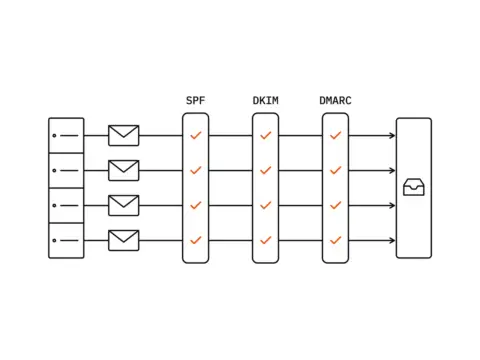
Email deliverability for four company domains
A mail server for four company domains signed nothing, published no DMARC policy and was rejected by Microsoft. Our engineers audited it, piloted the change on one domain and rolled it out in batches. The result: all three checks pass at Gmail, the Microsoft block was lifted, and the users noticed nothing.
-
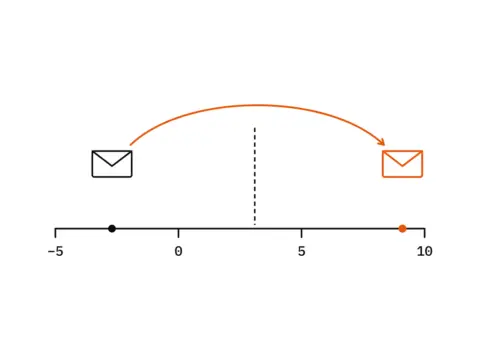
A spam filter that ran but did not protect
Services up, configuration valid, no errors in the system status. Yet phishing landed in the inboxes while partners' newsletters went to spam. Our engineers measured which detection mechanisms actually fired, repaired the causes, and three months later found and fixed a regression that only showed up hour by hour.
-
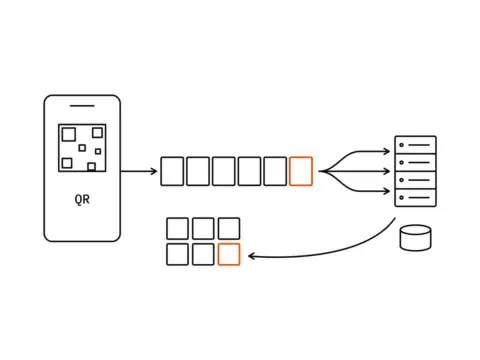
A photo upload app for wedding guests
Wedding guests scan a QR code, open one secret address and upload photos and videos straight from the phone: no app, no account, no login. Files of up to 5 GB land on the client's own disk, and the couple watches the gallery fill up during the party. One evening, no second chance, and phones from six years back.
-
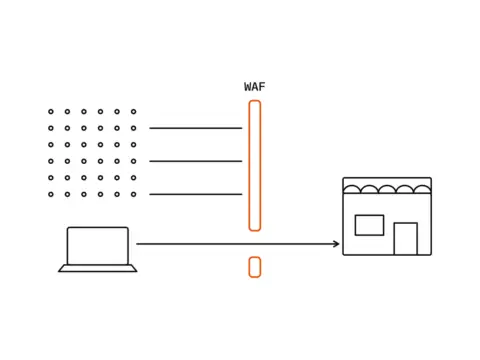
A shop flooded by bots that looked like customers
A WooCommerce shop with 52 products loaded slowly or not at all. The cause was a paid network of bots sending tens of thousands of requests an hour, each from a different home address, and every single bot behaved perfectly. Our engineers stopped the traffic at the edge of the network, and when the bots changed tactics a month later, the second rule took the load off within two minutes.
-
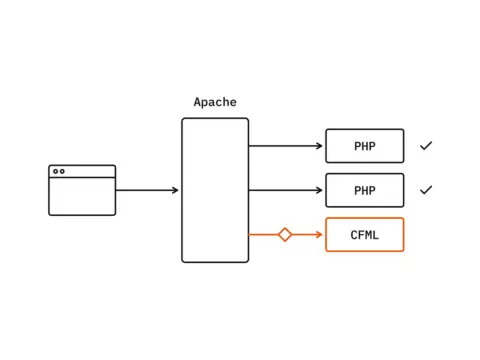
ColdFusion 2025 in production behind Apache: five traps that are not obvious
We prepared a production installation of Adobe ColdFusion 2025 on Debian 12, behind an Apache 2.4 that already serves several other sites. The installation itself takes 34 seconds. The attention went into the connector and the configuration details that are easy to miss: an error 503 caused by IPv6, mappings that reach into every virtual host, and a profile that quietly adds a debugger.


Questions about Linux and operations
Do you have experience with Linux and Windows Server?
Linux is our main platform: Debian and Ubuntu, web servers, database clusters and virtualisation with KVM and Proxmox. We have run Windows Server with IIS in production since 2015. We recommend moving to Linux unless you prefer to stay with Windows.
Is a WAF enough?
Not on its own. A web application firewall (WAF) filters typical attacks in front of the application and buys time. It does not close a vulnerability in the code. That is why we combine it with fixing known vulnerabilities, network segmentation and administrator access through a VPN only.
A WAF with rules written for your application triggers fewer false alarms and protects better in practice than the default configuration. If the code cannot be changed quickly, a WAF with isolation is a stop-gap until the update. The risk then falls but does not disappear.
What do we gain by moving to a container?
An environment that can be rebuilt. The same version and configuration apply on the developer's machine, on staging and in production, recorded in the repository instead of in one person's head. We test new versions of PHP, Lucee or ColdFusion alongside production and can roll them back. Moving to another server or another provider also becomes easier.
A container fixes no bug in the code and does not bring an unsupported version up to date. It only makes those changes easier.
Do you cover weekend duty from time to time?
Yes. Support and emergencies are covered around the clock (24/7), weekends included. For other enquiries we are available Monday to Friday, 9:00 to 17:00 Central European Time, and we reply within one working day.
Do you work on your own hardware, or do we need to provide a laptop?
We work on our own hardware. We set up access to your systems through a VPN, SSH or a remote desktop. We need a device from you only if you prefer that.
What is your hourly rate?
It depends on scope, engagement model and urgency. Describe your situation briefly and, after a conversation, we will send you an offer. You do not need a budget for that. We quote fixed prices for the entry products.
The first step: a server check with a written result
Server check
For companies with Linux servers that nobody knows well any more: before an upgrade, after the administrator has left or when a client asks about backups.
- Version and support status of the operating system and services
- Hardening: SSH access, firewall, open services and TLS certificates
- Updates: what is missing and how they have been applied so far
- Backups: what is backed up and whether a restore test is documented
- Monitoring and logs: what is monitored and what is missing
- List of findings in order of priority
At this stage we change nothing on the server. The check does not cover the application or its code. That is what the legacy review is for. We agree the scope and price in the intro call and confirm them in writing before we start. If you wish, you then receive a quote for ongoing support.
What the result contains
A written list of findings in order of priority, with recommendations on hardening, updates, backups and monitoring, plus an upgrade plan with maintenance windows. Both are yours.
Not sure which service fits your system?
Describe your system in two sentences. We will tell you which service fits and whether an entry product at a fixed price is the right first step.